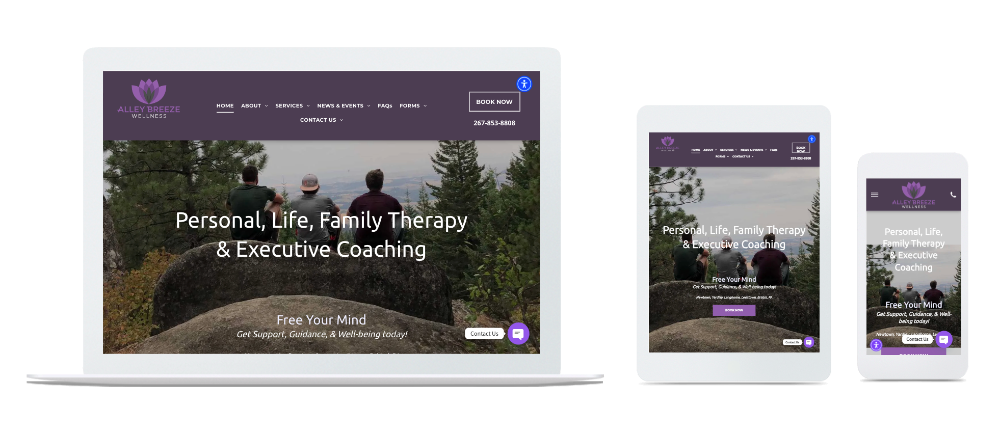
A website is displayed on a laptop , tablet , and cell phone.

True or False: A Mobile Friendly Site Automatically Rearranges Content for Screen Size and Improves Usability Across Devices

One Website. Every Device. Seamless Experience.

Welcome to your comprehensive guide on mobile-friendly, responsive web design. This page is crafted for business owners, webmasters, marketers, and anyone responsible for a website’s success. Here, you’ll discover what responsive design is, why it matters for usability and business growth, and how to ensure your website delivers a seamless experience across all devices—mobile, tablet, and desktop.


Mobile design encompasses various strategies for creating effective user interfaces on mobile devices, including responsive, adaptive, and separate mobile sites, as well as best practices for optimizing layouts and user experience.


A mobile friendly site automatically adapts its layout and content for any screen size, improving usability and accessibility across all devices. In today’s digital landscape, nearly half of all web activity happens on smartphones and tablets. If your website isn’t responsive, you risk losing customers, missing out on leads, and falling behind competitors. Mobile first design is a strategic approach that prioritizes designing for mobile devices before scaling up to larger screens, ensuring your site performs well for the growing number of mobile users. Web development plays a crucial role in bringing responsive and mobile-friendly sites to life by using techniques like CSS media queries and flexible layouts. Responsive design is essential for providing a positive user experience, boosting engagement, and driving business success in a mobile-first world.


A well-optimized mobile website demonstrates professionalism and builds trust with users.

an illustration of a computer monitor laptop and cell phone
an isometric illustration of a man using a tablet and a woman using a tablet

Ready for More Customers? Transform Your Website for Mobile, Tablet & Desktop


Is your current website turning away mobile users? In today’s world, nearly 50% of digital activity happens on smartphones and tablets—if your site isn’t responsive, you’re missing potential business. EZPagesPro builds mobile-friendly, tablet-ready, and desktop-optimized websites that look stunning and work flawlessly everywhere your customers are, offering a top website builder for small businesses who need a professional online presence.

Our responsive websites do more than just “fit the screen.” We design dynamic, future-proof sites that evolve with technology—so your online presence stays ahead of digital trends. Mobile optimization leads to a positive user experience, better user engagement, and increased mobile traffic by ensuring your site loads quickly and is easy to navigate on any device. To assess and improve your site's mobile usability, we recommend using Google's Mobile-Friendly Test, a quick and reliable tool to identify and address mobile-specific issues. Whether your audience visits from a laptop, the latest iPhone, or an older device, they’ll enjoy a smooth, visually captivating experience.


Mobile-friendly websites are essential for business success, opening doors to a larger customer base and fostering customer loyalty and repeat purchases, especially for small businesses that need a website to compete and grow online. Testing on actual devices is essential to ensure a smooth user experience on mobile.


Why choose EZPagesPro?

  • Custom Solutions: Every website is crafted for your brand, not a one-size-fits-all template.
  • Device-Specific Features: Mobile visitors see click-to-call buttons and easy navigation, while desktop users enjoy richer visuals—your site adapts to every scenario.
  • Easy Updates: Our platform makes it simple to manage your content, track analytics, and stay in control—no tech skills needed.
  • Expert Support: Small businesses and startups get agency-level design and personal support at every step.

Experience Responsive Design That Adapts to You


When building websites with EZPagesPro, we focus on responsive and adaptive design—two main approaches to ensuring your site works seamlessly across all devices. Responsive design uses fluid layouts, flexible images, and media queries to automatically adjust content and features based on the device's screen size. In contrast, an adaptive site relies on fixed layouts that are specifically tailored for certain devices, such as mobile phones, tablets, or desktops, by detecting the user's device and serving the most appropriate pre-built layout.


For example, you can enhance your site with integrated apps that extend website functionality such as online booking, live chat, and membership tools:


  • Instant Click-to-Call on Mobile
  • Streamlined Forms on Tablets
  • Full-Featured Layouts on Desktops


Testing your website on multiple devices—including smartphones, tablets, and desktops—ensures an optimal user experience and consistent performance across all platforms.


See for yourself—try our sites on your phone, tablet, and computer. Watch how images, buttons, and menus adapt instantly for effortless browsing, adjusting to each device's screen size.


Responsive design provides a seamless experience across all devices, while adaptive design may result in abrupt layout changes.


Your Website, Future-Proofed

The digital world never stands still—and neither do we. Our team constantly monitors web trends and updates your site to stay compatible with new devices, screen sizes, and browsers through managed website services that enhance your online presence. You’ll never need a costly redesign just to keep up.


Transparent Pricing, No Surprises

We believe in honest, upfront pricing—no hidden fees, ever.


100% Satisfaction Guarantee

If you’re not completely happy, we’ll make it right.

Get Started Today—Limited Openings This Month


Ready to boost your online presence and capture more leads? Book your free consultation now—our team has limited onboarding slots available this month, and you can contact EZPagesPro to discuss your project and goals in detail.


EZPagesPro—websites that grow with your business, today and tomorrow, backed by a comprehensive website services disclaimer and policy framework that supports a secure, professional experience.

Isometric illustration showing website building and design

Is responsive web design the ultimate solution for adapting to the ever-changing mobile world?


In today’s digital age, having desktop-only sites just won’t cut it anymore. With nearly 50% of digital media time being spent on mobile devices, it’s clear that websites need to adapt to be mobile-friendly, tablet-friendly, and desktop-friendly. This is where EZPagesPro comes in, offering responsive web design that ensures your site looks great on any device and includes essential website features every business needs to succeed online. Whether your customers are accessing your website on a smartphone, tablet, or computer, they’ll have a seamless and visually appealing experience.


Unlike separate mobile sites or a dedicated mobile site—which involve creating a stand-alone website optimized specifically for mobile users—responsive design eliminates the need for separate mobile URLs. This simplifies content management, ensures consistency between the desktop version and mobile experience, and enhances link equity. While separate mobile sites and dedicated mobile sites can offer tailored user experiences and faster performance, they often require more maintenance and can present SEO challenges. Responsive web design, by contrast, adapts your content fluidly across all devices without the hassle of managing multiple versions.


However, it’s important to recognize that while responsive web design is a significant step forward, it is not the ultimate fix. The digital landscape is perpetually evolving, with new devices, platforms, and user expectations emerging regularly. At EZPagesPro, we understand that responsive design is an ongoing commitment, not a one-time solution. We continuously update and refine our design strategies to keep pace with technological advancements and ensure that your website not only looks great but also meets the ever-changing needs of your users. Additionally, with Google’s mobile-first indexing, the mobile version of your website is now the primary factor in determining your search rankings, making mobile optimization more critical than ever.


Your business deserves a responsive design that works for everyone, and that’s exactly what EZPagesPro is dedicated to delivering. Yet, we also remain vigilant, ready to adapt and innovate as new challenges arise in the mobile world, ensuring that your digital presence is as dynamic and resilient as the market itself. For clients who require even more tailored experiences, we also consider adaptive sites, which use fixed layouts for specific devices. Adaptive design can provide a more customized experience for certain devices but typically requires more development effort compared to responsive design.

How Responsive Web Design adapts to user behavior and environment based on screen size, platform, and orientation


Responsive Web Design (RWD) dynamically adjusts the appearance of a website according to the specific device being used by the viewer. Unlike adaptive design, which uses fixed layouts tailored for specific devices and switches between them based on device detection, responsive design utilizes a fluid layout that adapts smoothly to the device’s screen size. At the core of this approach is a fluid grid system, which forms the foundation of responsive web design by allowing layouts to scale proportionally and reflow content for any screen size. This approach leverages flexible grids and percentage-based widths to ensure a seamless, scalable experience across mobile phones, tablets, and desktops. Here’s how it adapts seamlessly to different factors such as screen size, platform, and orientation:


Adapting to Screen Size

With flexible grids and layouts at its core, RWD allows content to reflow based on the screen size of the device. Whether you’re viewing a site on a tiny mobile screen or a large desktop monitor, the layout shifts to provide an optimal viewing experience. This means text is readable without zooming, and clickable elements are appropriately sized.


You can test a site's responsiveness by resizing the browser window on a desktop to see how the layout adapts to different screen sizes.


Adjusting to Platforms and Operating Systems

  • RWD accounts for the variances across platforms and operating devices by using CSS media queries. These queries enable the website to apply different styles depending on the device’s characteristics. Responsive design ensures compatibility across different operating systems by leveraging CSS media queries to deliver appropriate layouts and styles for each device. For instance, a website might load lighter animations or fewer visual effects on a mobile device compared to a desktop, fostering faster load times and improved usability.

Orientation Changes

  • When a user switches from portrait to landscape mode on their device, a responsive website automatically rearranges its elements to suit the new orientation. The layout change is fluid, ensuring that usability is maintained regardless of how the device is held.
  • RWD also considers the broader settings on a user’s device, such an activated VPN or specific accessibility settings. This capability ensures that all users, regardless of their device’s settings, can access and navigate the site effectively.


By integrating these flexible and intelligent strategies, responsive web design ensures that a website is functional, accessible, and visually appealing across all devices and settings, eliminating the need to create multiple versions of a website for different devices. This dynamic adaptation significantly enhances user experience and engagement.

KEY DESIGN ADJUSTMENTS FOR SMALLER SCREENS


When browsing websites on smaller devices like smartphones or tablets, noticeable changes in the design are essential to enhance readability and usability. Responsive typography, which uses relative font sizes such as ems, rems, or viewport width (vw), ensures that text remains readable across different resolutions without requiring manual zooming. These modifications ensure that the site remains functional and aesthetically pleasing across different devices. Here are some common design changes you might observe:


Simplified Navigation

  • Menus often consolidate into fewer options or transform into a dropdown format, commonly known as a "hamburger menu", to save space and maintain ease of use.


Responsive Layouts

  • Websites adapt to various screen sizes by restructuring their layout. For example, a website might display content in multiple columns on a desktop but will stack these columns vertically on a smaller screen. This stacking helps in maintaining the flow of content and ensures that users do not miss any information.
  • Flexible layouts and fluid grid systems allow content to adapt smoothly to different screen sizes, ensuring usability and readability across devices. A flexible grid layout and fluid grids use relative units like percentages to create proportional, adaptable designs that shift and resize elements as needed. Additionally, flexible images in responsive design are set to a maximum width of 100% within their containers, preventing overflow and maintaining layout integrity.


Adaptation of Visual Elements

  • Visual elements such as images and logos are resized or repositioned based on the screen dimension.
  • Images can be scaled down to fit the width of the device, preventing horizontal scrolling that can detract from user experience. Using modern image formats like WebP or AVIF can further improve performance and responsiveness, as these formats are optimized for faster loading and better quality across devices. Flexible images in responsive design are typically set to a maximum width of 100%, ensuring they scale properly within their containers and do not overflow or break the layout.
  • Logos might simplify, moving to a more prominent position like the center top of the page, often just above the navigation, to maintain brand visibility.


Content Prioritization

  • To prevent clutter on smaller screens, non-essential content such as sidebars or decorative images often disappears or is moved to other sections like the bottom of the page. This prioritization helps in focusing the user's attention on the most crucial information first.


Increased Font Size and Button Spacing

  • Smaller screens require larger fonts to improve readability. Additionally, button sizes may increase, and the spacing between clickable elements is typically enhanced to accommodate touch interactions and prevent accidental taps.
  • Responsive typography uses relative font sizes—such as ems, rems, and viewport width (vw)—to ensure text remains readable across different resolutions without requiring manual zooming. This approach adapts font sizes and line spacing dynamically, enhancing readability and accessibility on all devices.


Optimized White Space

  • While larger screens might feature generous white space to create a visually appealing layout, on smaller screens, this space is often reduced. This optimization helps in maximizing the use of space for critical content without overwhelming the user.


Each of these changes contributes to a smoother, more engaging mobile experience. Responsive design not only adjusts how content looks but also improves how it functions across different devices, ensuring that all users have a positive interaction with your website, no matter their screen size.

Fully Responsive Website FAQs

  • How can responsive web design help in avoiding duplicate content issues?

    Responsive web design plays a pivotal role in maintaining the integrity and uniqueness of your website's content. By adopting a responsive design, you effectively eliminate the risk of creating multiple versions of the same page, which is a common issue in websites with separate mobile and desktop versions.


    Highlights of Responsive Design Benefits:

    Single URL Use: A responsive website adjusts to all screen sizes without requiring a separate website version for mobile devices. This means you maintain just one URL, which simplifies Google's indexing process and reduces the chances of content duplication.


    Enhanced Site Management: Managing one responsive website is considerably easier compared to managing separate versions. This streamlined approach not only reduces the likelihood of replicating content but also simplifies updates and maintenance. When changes need to be made, they're implemented universally across all devices, ensuring consistency.


    Improved User Experience: Responsive design ensures that all users, regardless of device, receive the same high-quality experience. This uniformity helps in maintaining consistent content that is free from duplications that can occur when tailoring content to different devices.


    In conclusion, while responsive web design inherently does not prevent duplicate content, its structure makes it easier to manage content effectively. By keeping to one version of your site, you mitigate risks of duplicating content across different device-specific versions, which not only enhances SEO but also improves overall user engagement. This makes responsive web design a crucial strategy in digital content management and SEO optimization.

  • Essential Components of a Mobile-Friendly Website

    A mobile-friendly website is carefully designed to accommodate the unique needs of users on smartphones and tablets. Here’s what you'll typically find at the core of an effective mobile experience:


    • Clear Call-to-Action (CTA) Buttons: Large, easy-to-tap buttons placed in prominent locations make it simple for users to take the next step—whether it’s signing up, making a purchase, or contacting your business.
    • Streamlined Navigation: Menus are kept concise and intuitive, often condensed into familiar icons (like the hamburger menu) to allow users to find what they need without unnecessary scrolling or confusion.
    • Optimized Visuals: Images and videos are automatically compressed and resized so they load quickly and display crisply without hogging bandwidth. This ensures your content looks great without slowing things down.
    • Thumb-Friendly Layout: Interactive elements such as buttons and links have ample spacing around them, reducing the chance of accidental taps and making one-handed navigation a breeze.
    • Readable Text: Fonts are sized for easy reading on small screens, with sufficient contrast against the background to reduce eye strain.
    • Minimal Distractions: Elements that might clutter a desktop layout—like excessive ads or sidebars—are either minimized or repositioned to keep users focused on key information.

    These features work together to ensure anyone visiting your site on a mobile device enjoys a smooth, engaging experience, no matter where they are or what device they're using.

  • How does page speed impact SEO and user experience, and how can responsive web design help?

    Page speed is a crucial element that directly influences your website’s search engine optimization (SEO) and the overall user experience. A fast-loading website is essential for good SEO because search engines like Google prioritize websites that provide a quick and smooth experience to users. This, in turn, helps enhance your site's visibility and ranking in search engine results.


    The Role of Responsive Web Design

    Responsive web design plays a significant role in optimizing page speed. It ensures that your website adjusts seamlessly across various devices, including smartphones, tablets, and desktops. By adopting responsive design, your website can load faster and more efficiently on any device, eliminating delays that could frustrate users and harm your SEO efforts.


    Benefits of Improved Page Speed Through Responsive Design

    Implementing responsive web design not only improves page speed but also boosts traffic and conversion rates. A website that loads quickly and displays content effectively on any device enhances user engagement and satisfaction. This improvement in user experience motivates visitors to stay longer and interact more with your site, leading to higher conversions and revenue.


    By prioritizing page speed and responsive design, you can dramatically enhance site performance, user experience, and SEO, setting a solid foundation for your online success.

  • How does mobile-first indexing by Google affect website ranking?

    With Google's shift to mobile-first indexing, the mobile version of your website now carries significant weight in determining your search engine rankings. This change means Google primarily evaluates how your site performs and displays on mobile devices when assessing its relevance and quality for search results.


    Why Does This Matter for Your Rankings?


    Mobile Experience is Key: If your website isn’t optimized for mobile users, you risk lower rankings—even if your desktop site is flawless. Responsive design ensures your content, layout, and navigation work seamlessly across screens, aligning with Google's preference for mobile-friendly pages.


    Single Consistent Experience: A responsive site delivers the same high-quality content to both mobile and desktop users, allowing Google to efficiently crawl and index your pages without discrepancies that could affect rankings.


    Faster Load Times, Better Results: Mobile users expect quick, responsive sites. Responsive design techniques typically streamline your site, improving load times and reducing bounce rates, which Google recognizes as a positive ranking signal.

    Adapting your site for mobile-first indexing isn’t just a technical best practice—it’s now essential for maintaining and improving your visibility in search results.

  • What is the relationship between responsive web design and user conversion rates?

    The improved user experience offered by responsive web design typically leads to higher conversion rates, as users are more likely to subscribe or make purchases due to better accessibility and usability.


  • Why are conspicuous CTA buttons important on mobile websites, and how should they be designed?

    Clear and prominent Call-to-Action (CTA) buttons are essential on mobile websites because they guide users toward taking meaningful actions—such as making a purchase, signing up, or contacting support—without confusion or hesitation. In the context of smaller screens, a well-designed CTA button grabs attention and provides a seamless path to conversion, which is especially crucial in competitive sectors like eCommerce.


    Best Practices for CTA Button Design on Mobile:


    • Visibility: Make CTA buttons large enough to stand out but not so big that they overwhelm the screen or disrupt the overall layout.
    • Touch-Friendly: Ensure buttons are easy to tap, keeping ample spacing around each one to prevent accidental clicks.
    • Color and Contrast: Use bold colors and strong contrast to distinguish CTA buttons from other page elements, following accessibility guidelines to improve usability for all users.
    • Limit Quantity: Avoid clutter by featuring only a few, well-placed CTAs per page, helping users focus on the most important actions.

    By following these design principles, you make it easier for users to interact with your website, ultimately increasing the likelihood of conversions and fostering a more satisfying user experience.

  • What does it mean to have a thumb-friendly website layout and why is it important?

    When it comes to delivering a seamless user experience on mobile, some websites truly set the bar by blending visual appeal, intuitive navigation, and purposeful features—all wrapped in responsive design. Let’s explore how several well-known brands accomplish this:


    Prioritizing Accessibility and Search

    Effective mobile websites greet visitors with features that get them where they want to go, fast. For example, major healthcare portals often lead with a prominent appointment search or key service options, ensuring users can quickly find critical resources without unnecessary digging.


    Concise, Action-Oriented Layouts

    Simplicity is key. Forward-thinking brands like innovative software providers structure their mobile homescreens with minimal color palettes, clear text, and straightforward calls-to-action. No clutter or flash—just a direct path to exploring services, products, or initiating contact.


    Bold Visual Design That Guides Navigation

    Art institutions and outdoor lifestyle companies leverage compelling imagery to convey brand essence immediately. Striking hero images offer a sense of place or product-in-action, while easy-scroll layouts and clean navigation bars let users browse, shop, or learn more with minimal friction.


    Strategic Use of CTA Buttons and Navigation Menus

    Whether it’s retail, tech, or finance, a hallmark of well-designed mobile sites is strategically placed call-to-action buttons—they’re visible but not intrusive. Streamlined hamburger menus or sticky nav bars help users explore without feeling overwhelmed or lost, regardless of where they are on the page.


    Content that Reflects Brand Personality

    The best examples infuse personality through playful doodles, color schemes, or editorial touches—making the digital experience memorable, even for first-time visitors. This is especially true for creative platforms or e-commerce sites that want to stand out from the crowd and leave a lasting impression on their audience.


    Optimized for Easy Browsing and Shopping

    Clothing retailers often divide their sites into clear categories right on the homepage, letting shoppers immediately filter for deals, new arrivals, or trending pieces. Essential icons and well-organized sections further streamline the browsing and buying journey, ensuring that users never feel lost in a maze of products.


    Minimalism Done Right

    Sometimes less truly is more. Forms providers or digital platforms focused on a single service frequently use clean layouts, subtle backgrounds, and an uncluttered homepage. Every piece of necessary information is just a tap away under a simple menu, emphasizing clarity over complexity.


    Storytelling and Visual Tours

    Leisure or hospitality brands might use soft color palettes, illustrations, or even virtual tours, creating an immersive sense of place that is both inviting and navigable. This approach welcomes users in, making them feel as though they’re already part of the experience.


    Inspiration for Food Lovers and Beyond

    Recipe websites and blogs targeting enthusiasts stand out by using vibrant photography and dynamic content sections. Featured recipes double as hero images, and intuitive categorization helps users search for exactly what they’re craving (or discover something entirely new).


    Together, these examples show how thoughtful mobile design can create engaging, easy-to-use experiences that not only reflect the spirit of the brand but also keep the user’s journey front and center.

  • What are some best practices for ensuring your website is mobile-friendly?

    To ensure your website is mobile-friendly, follow these best practices:


    • Use responsive design
    • Optimize images and media for fast loading
    • Simplify navigation
    • Make interactive elements touch-friendly

    Use Google’s Mobile-Friendly Test to evaluate your site’s mobile usability and identify any issues that could impact user experience or search rankings

  • What are the core concepts and key features of responsive web design?

    Responsive web design is built on core concepts such as fluid grids, flexible images, and CSS media queries. Key features include:


    • Adaptive layouts
    • Optimized images

    Simplified navigation that automatically adjusts web pages for optimal usability and appearance across devices


    These principles ensure your site is accessible, user-friendly, and performs well on any screen size.


  • What are the differences between a mobile site and a responsive site?

    A mobile site is a separate, mobile-specific version of your website, often with its own URL (like m.example.com), designed specifically for mobile devices. In contrast, a responsive site uses a single codebase and URL, automatically adjusting its layout and content to fit any screen size. Responsive design is generally easier to maintain, avoids duplicate content issues, and is the default approach in web design for accessible, search-engine-optimized experiences. While a dedicated mobile site can offer tailored functionalities and sometimes faster performance, it requires more maintenance and can create SEO challenges due to duplicate content and split link equity.

Introduction to Responsive Web Design


Responsive design automatically adjusts the layout and content based on the size of the screen viewing the site, ensuring a good user experience regardless of device. Responsive design is achieved through a combination of fluid grids, flexible images, and CSS media queries that adjust a website's look based on the screen size.


  • Responsive design: Automatically adjusts the layout and content based on the size of the screen viewing the site, ensuring a good user experience regardless of device.
  • Fluid grids: Use relative units like percentages instead of fixed units like pixels, allowing the layout to scale smoothly across different screen sizes.
  • Flexible images: Images that automatically resize within their containers to prevent overflow and maintain layout integrity on any device.
  • CSS media queries: Essential for responsive design, these allow different styles to be applied based on the characteristics of the device viewport, such as width and height.


With more people than ever accessing the internet from mobile devices, having a responsive website is no longer optional—it’s essential. Responsive web design not only delivers a consistent and enjoyable user experience across all platforms, but it also helps your business stand out in search engine results. Search engines like Google reward sites that are optimized for mobile phones and tablets, making responsive web design a smart investment for any business looking to grow its online presence.

Technical Aspects of Responsive Design


At the heart of responsive design are several technical building blocks that work together to create seamless experiences across different devices. CSS media queries are a cornerstone of this approach, allowing developers to apply specific styles based on characteristics like screen width, device orientation, and resolution. This means your website can look and behave differently on a smartphone than it does on a desktop, all from a single codebase.


Key Definitions and Concepts:

  • Responsive design automatically adjusts the layout and content based on the size of the screen viewing the site, ensuring a good user experience regardless of device.
  • Fluid grids use relative units like percentages instead of fixed units like pixels, allowing the layout to scale smoothly across different screen sizes.
  • Flexible images are images that automatically resize within their containers to prevent overflow and maintain layout integrity on any device.
  • CSS media queries are essential for responsive design as they allow different styles to be applied based on the characteristics of the device viewport, such as width and height.


How Responsive Design Works:

  • Fluid grids: These use relative units (like percentages) to create layouts that scale proportionally to the screen size, ensuring content remains organized and readable on any device.
  • Flexible images: Images are set to automatically resize within their containers, preventing them from overflowing or breaking the layout on smaller screens.
  • CSS media queries: These are essential for responsive design as they allow different styles to be applied based on the characteristics of the device viewport, such as width and height. For example, a media query can specify that a navigation menu collapses into a hamburger icon on screens smaller than 768px wide.


By mastering these technical aspects—media queries, flexible grids, and flexible images—web designers can deliver responsive sites that look polished and perform flawlessly across all devices and browsers.

Search Engine Rankings and Performance


Responsive web design is a game-changer when it comes to search engine rankings and overall website performance. With Google’s mobile-first indexing, the mobile version of your website is now the primary factor in determining your search ranking. This means that having a responsive website isn’t just about aesthetics—it’s crucial for being discovered by new customers and benefits from SEO services that use built-in Duda tools for high rankings.


A responsive website ensures that your content is accessible and engaging for mobile users, which leads to improved user experience, longer site visits, and higher conversion rates. Responsive design also helps you avoid duplicate content issues, since all users and search engines access the same URL regardless of device. This consolidation of link equity and content makes it easier for your site to climb the search engine rankings, driving more organic traffic to your business. In today’s competitive digital landscape, a mobile friendly, responsive website is essential for maximizing your visibility and performance online.


Best Practices for Responsive Web Design


Creating an effective responsive website starts with a mobile first design approach—designing for smaller screens before scaling up to larger ones. This ensures that your most important content and features are front and center for mobile users, who make up a significant portion of web traffic, and lays the groundwork to transform clicks into customers with strategic web design. Use these best practices:


  • Use relative units like percentages or ems, rather than fixed widths, to allow your design elements to scale smoothly across different devices and screen sizes.
  • Optimize images by serving appropriately sized images for each device to dramatically improve site speed and user experience.
  • Simplify navigation for mobile users.
  • Make interactive elements touch-friendly.
  • Test your website on a variety of devices and browsers to catch any issues before your customers do.


Responsive design is often preferred for new projects due to its flexibility and ease of use.

By following these best practices, you’ll create a responsive website that delivers a seamless, engaging experience for every visitor, no matter how they access your site.

Common Mistakes to Avoid in Responsive Design


Even with the best intentions, it’s easy to make mistakes in responsive web design that can undermine your site’s effectiveness. One of the most common errors is failing to test your website on different devices and browsers, which can lead to unexpected layout problems and a poor user experience. Another frequent mistake is relying on fixed widths instead of relative units, causing your design to break or look awkward on smaller screens.


Neglecting to optimize images for various screen sizes can also slow down your site and frustrate users, especially those on mobile devices with limited bandwidth. These issues not only hurt your user experience but can also negatively impact your search engine rankings. By prioritizing thorough testing, using relative units, and optimizing all design elements for flexibility, you can avoid these pitfalls and ensure your responsive website delivers the best possible experience for every visitor.


Mobile Optimization: Enhancing Performance and User Experience on Mobile Devices


Mobile optimization is no longer optional—it’s a necessity for any business looking to capture today’s web traffic. With the majority of users now browsing on mobile devices, a mobile friendly site is essential for reaching your audience and staying competitive in search engine rankings. Responsive web design is the foundation of effective mobile optimization, using flexible grids, flexible images, and CSS media queries to ensure your website layout adapts seamlessly across devices and screen sizes.


A mobile optimized website not only improves usability for mobile users but also supports improved search engine rankings, thanks to Google’s mobile first indexing. This means that your site’s mobile version is the primary factor in how it appears in search results. By prioritizing mobile optimization in your web design, you create a positive user experience that keeps visitors engaged and encourages them to take action—whether that’s making a purchase, booking an appointment, or contacting your business.


Responsive web design ensures that your content, images, and interactive elements look great and function smoothly on any device, from smartphones to tablets to desktops. By focusing on mobile optimization, you’ll see increased engagement, lower bounce rates, and better performance across devices—all of which contribute to your business’s online growth.


Touch-Friendly Interactions

For mobile users, touch-friendly interactions are key to a smooth and enjoyable browsing experience. On mobile devices, users rely on taps and swipes rather than clicks, so it’s crucial to design interactive elements that are easy to use with fingers and thumbs. Large, easily tappable buttons and links reduce frustration and make navigation effortless, while forms and input fields should be optimized for quick, error-free entry.


Enhancing user experience goes beyond just button size—consider spacing between interactive elements to prevent accidental taps, and use clear visual cues to indicate which elements are clickable. By making your site’s navigation, forms, and calls to action touch-friendly, you ensure that mobile users can interact with your website confidently and efficiently. Additionally, integrating device features like click-to-call or tap-to-email can streamline user actions and drive higher engagement.


Leveraging Device Capabilities

Modern mobile devices offer a range of built-in capabilities that can be harnessed to create richer, more personalized user experiences. By leveraging features such as geolocation, accelerometer, and gyroscope, your website can deliver interactive and context-aware content that delights users and sets your business apart.


For example, a local business can use geolocation to display nearby store locations or offer location-based promotions, while a fitness app might use the accelerometer to track steps or activity levels. Games and interactive experiences can utilize the gyroscope for more immersive gameplay. To further enhance performance, adopting modern image formats like WebP or JPEG XR ensures that images load quickly and look sharp on all devices, reducing page load times and improving overall user experience.


By thoughtfully integrating these device capabilities, you can create a mobile friendly site that not only meets but exceeds user expectations, driving engagement and loyalty.


Mobile-Specific Features and Enhancements

Delivering an optimal user experience on mobile devices means going beyond simple resizing. Mobile-specific features and enhancements are designed to make navigation and content consumption effortless, no matter the device’s screen size.

Related Blog Articles

Isometric graphic of
By Danni White July 24, 2020
Discover the key differences between UI and UX design. Understand how each plays a vital role in creating effective and engaging digital experiences.
Laptop, smartphone, pie chart, and calculator on an orange gradient background, illustrating data analysis.
By Admin May 11, 2019
Transform your online presence with a stunning, responsive website designed to engage visitors and boost your business revenue. Modernize today for lasting success!
READ MORE POSTS
an isometric illustration of a rocket being launched

Ready to Takeoff?

We will collaborate with you to develop a fully responsive website, optimizing for conversions.

TALK ABOUT YOUR WEBSITE